Get your fleet to the regatta — and back.
RiggerPlus turns a pile of shells, riggers and oars into a trailer load plan that fits, a towing-safe route with fuel and overnight stops, and a day-of itinerary your drivers can follow from their phone.
- Fit, support and tipping checks
- Routes scored for towing
- Driver links, no app install
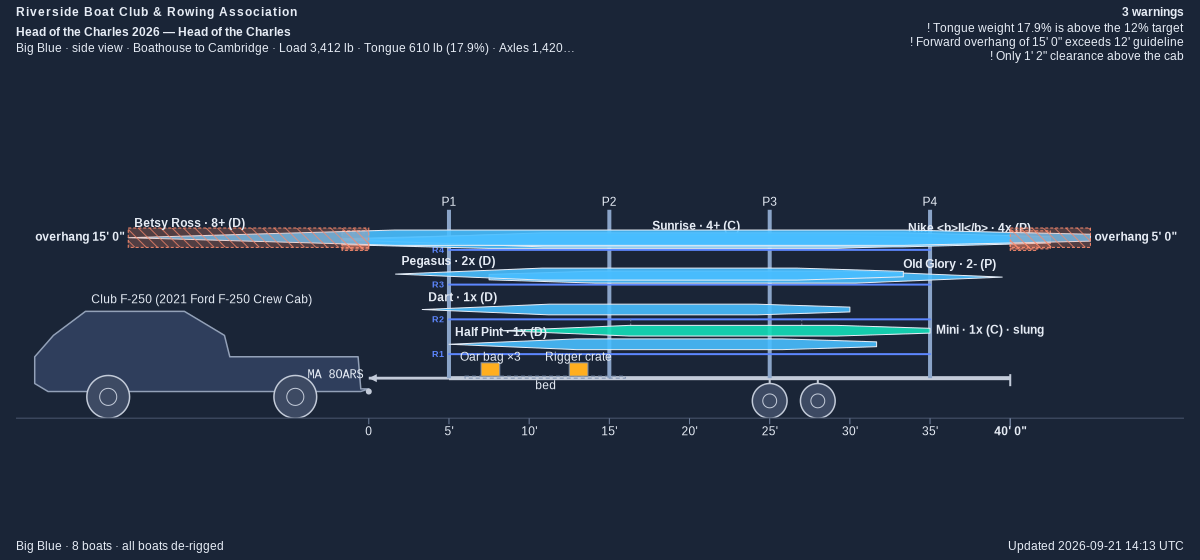
Everything between the boathouse and the start line
Built for the person who owns the trailer keys
See all featuresFleet & assets
Boats, hull classes, trailers, racks and tow vehicles with real dimensions and weights. A printable measurement worksheet gets a new trailer into the system in one walk-around.
Load planning
Drop shells onto racks and get instant fit, gunwale overlap, post support and tipping checks, axle weights, and top-down and side diagrams for every leg. Boats carry forward from stop to stop.
Route planning
Alternatives for every leg, scored on bridge clearance, fuel range, tolls and road mix for your truck-and-trailer profile. Truck stops, fuel and hotels are placed into a multi-day schedule.
Trip day
A public itinerary for the team and a private link for each driver: current leg, load diagram, inventory checklist, and one-tap Arrived / Departed so everyone knows where the trailer is.
Diagrams your riggers can actually use
Know where every gunwale sits before anyone lifts a boat
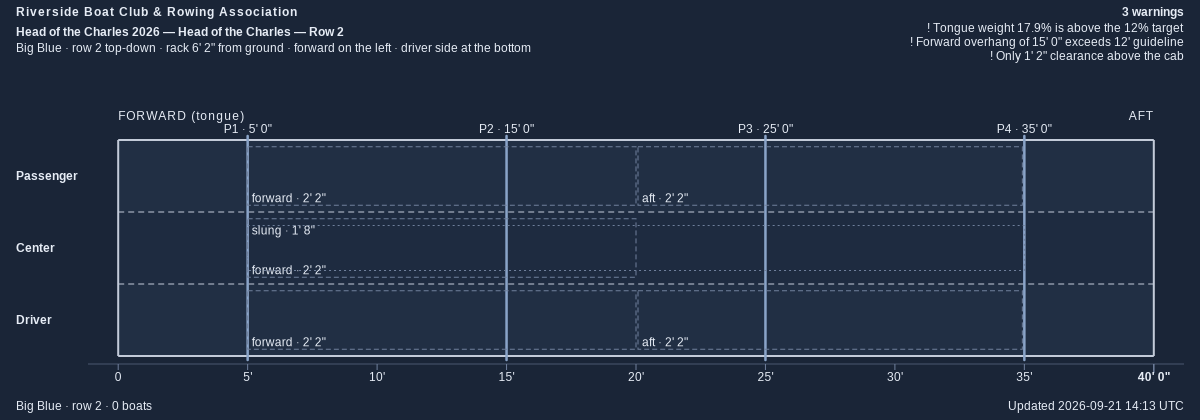
Top-down diagrams are drawn the way a US crew sees the trailer — driver side at the bottom, tongue to the left. Boats sharing a rack are shown side by side, forward boat outboard, so the loading crew can see exactly how the shells nest. Rule violations are flagged on the drawing itself, not buried in a list.
- Fit rules that match the boathouse: gunwale-to-gunwale collisions, deck-only support warnings, post spread tipping checks.
- Per-leg overrides: drop a boat at the regatta, slide another over for the ride home — the return plan is pre-filled.
- Print or share: PNG and SVG diagrams for the trailer, the chat thread, or the clipboard on the trailer tongue.
How it works
Three steps from an empty trailer to a planned trip
Measure the trailer
Print the measurement worksheet, walk the trailer once with a tape, and enter rack widths and post spacing. Common trailer templates get you most of the way.
Add boats and vehicles
Your Boathouse Connect fleet syncs in; hull-class defaults fill in length, beam and weight so you only correct what is unusual. Add the trucks that tow.
Plan the trip
Pick the regatta, add stops, load the trailer and hit Plan route. Share the itinerary with the team and send each driver their link.
For Boathouse Connect clubs
Your club is already set up
RiggerPlus signs in with your Boathouse Connect account. Regattas, boats, members and club branding come across automatically, so equipment managers start planning on day one and athletes see itineraries and load diagrams without creating anything new.
What syncs from Boathouse Connect
- Regattas your club is entered in
- Boats and their hull classes
- Members, roles and who may plan trips
- Club logo and colours on every public page
Ready for the next regatta?
Sign in with your Boathouse Connect account, or ask us for a walkthrough with your own trailer and fleet.